UI fields
CMSImport builds the settings UI of data providers and advanced setting providers from attributes on their options class.
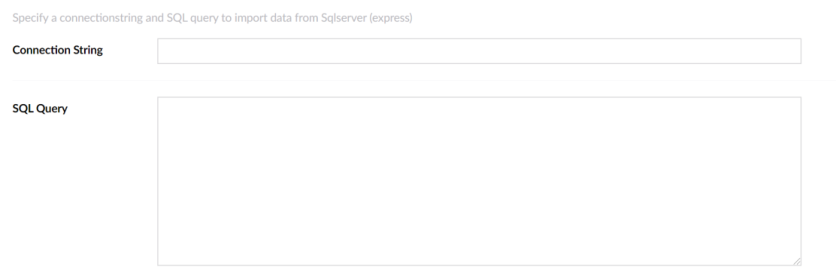
For example, this property renders a text box for a connection string:
Available attributes
All attributes are in the CMSImport.Core.Attributes.EditorFields namespace.
| Attribute | Property type | Renders |
|---|---|---|
BooleanField |
bool |
A toggle. |
ContentPicker |
string |
A content picker. |
DatasourcePicker |
FileOrUrlPickerModel |
A file upload or URL field. |
DateFormatField |
string |
A date format field. |
DropDownField |
DropDownModel |
A drop-down list. |
HiddenField |
string |
A hidden field. |
LabelField |
string |
A read-only label. |
MediaPicker |
string |
A media picker. |
MemberGroupOrColumnPickerField |
List<string> |
A picker for Member Groups. |
SmallTextBoxField |
string |
A small text box. |
TextBoxField |
string |
A text box. |
TextAreaField |
string |
A text area. |
Validation
Use the standard .NET validation attributes to validate a value:
[Required(ErrorMessage = "Connection string is required")]
[TextBoxField(Name = "Connection string")]
public string ConnectionString { get; set; }
For a DatasourcePicker, use [FileModelValidation] from CMSImport.Core.Attributes.ValidationAttributes.