Block editor mapping
You can map data source fields to the blocks of a Block Grid or Block List property.
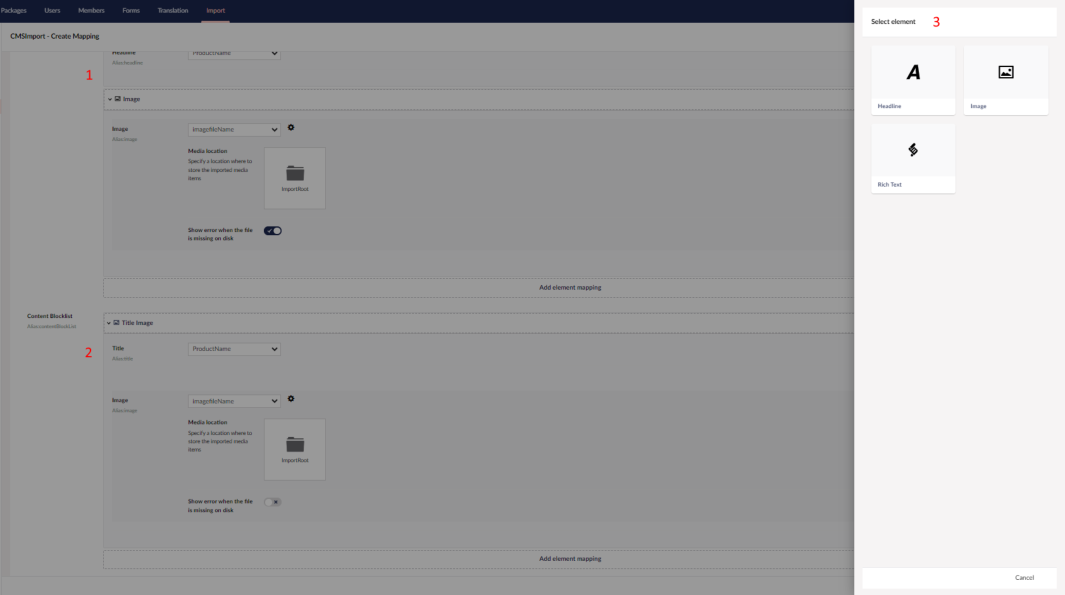
The numbers in the screenshot match the list below:
- Block Grid mapping. Pick a block and map data source fields to its properties, the same way you map a normal document. Click Add Element Mapping to add a block. You can sort the blocks after adding them.
- Block List mapping. Works the same as Block Grid mapping.
- Element picker. Select the Element Type (block) to add. Only the blocks allowed for the property are listed.
Limitations
Nested blocks are not supported
A block that itself contains a Block List or Block Grid property can't be mapped.