SEO property
The SEO Checker property editor shows editors how a page appears in Google search results, and checks how well the page is optimized for a keyword.
Add a property that uses the SEO Checker Data Type to your Document Types. To configure it, see Property editors.
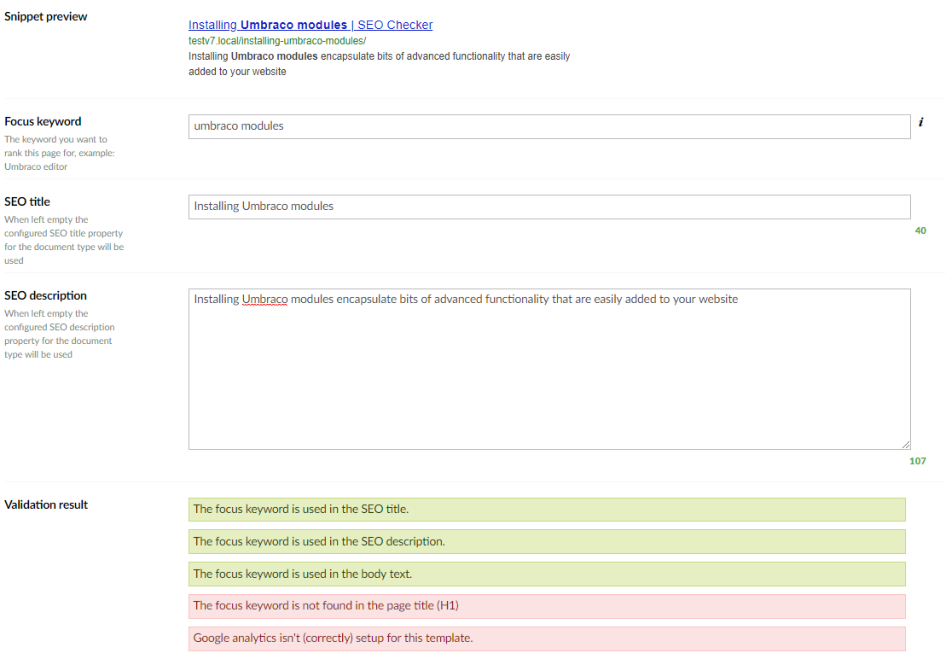
Snippet preview
The snippet preview shows the title, URL and description as they appear in Google search results.
Note
The preview needs the <title> and <meta name="description"> tags in the template that renders the page.
See Render meta tags.
Focus keyword
Enter the keyword you want the page to rank for. SEOChecker checks whether the keyword is used in the most important parts of the page:
- the page title (
<h1>) - the URL
- the SEO title (
<title>) - the SEO description (
<meta name="description">) - at least once more in the text of the page
The results appear under Validation result.
SEO title and description
Enter the SEO title and SEO description of the page. When you leave them empty, SEOChecker uses the default properties configured for the Document Type. See Document Type settings.
If your Document Type already has properties for the title and description, you can map those in the Data Type instead.